FAQ
The answers to most frequently asked questions.
Most common questions
How to download TotalD?
Download the installer from the official website. Once it has downloaded, double-click it to start the installation.
How to install TotalD?
After downloading TotalD, double-click the installer. The installation will start automatically; follow the wizard to complete it. The installer is clean and contains no ads.
How to buy TotalD?
TotalD is free and ad-free. Some advanced features are available with the Pro version.
How to use the "Labels"?
The use of labels is a simple function to filter the download list. By tagging each download, they are classified and filtered according to their label.
When you add a file for downloading, whether torrent or direct download, in the dialog box to add the download you can assign a label to the file you are going to download.
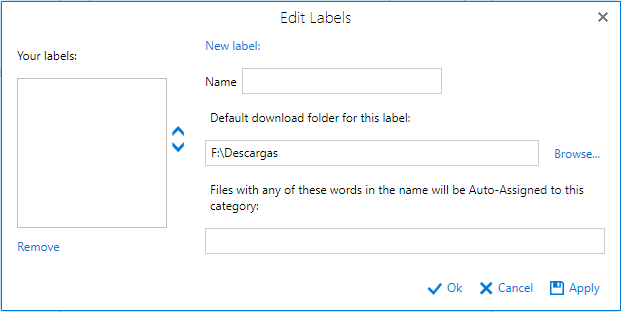
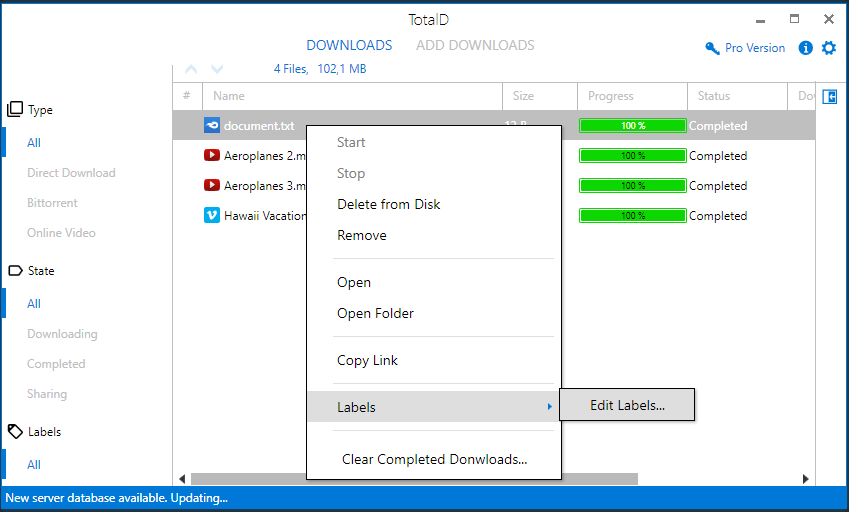
From the "Downloads" screen, you can also manage the labels for the files you are already downloading.
For an easy management of the downloads, you can specify a default target folder for each label and some keywords to auto-assing labels to the files.
Once you have created the labels, these will help to filter the files in the "Downloads" screen.
How to prioritize the downloads?
In the "Downloads" screen, select the file you want to change its position and click on the arrows at the top to move it up or down.
How fast the Torrents are downloaded?
Usually, when a torrent is more popular, the download speed will be faster because it means it has more available sources.
How to configure simultaneous downloads?
In the "Options" window, go to the tab "Bittorrent" and in "Torrents queue" you can increase or decrease the number of simultaneous uploads and downloads you want to do.
Why TotalD asks me to insert a text (captcha) to start the download?
CAPTCHA is a type of challenge-response test used in computing to ensure that the response is not generated by a computer. When you enter the character set shown in the picture, the page checks it is not a machine who asked the dowload and then allows the download to start. To avoid captchas you can buy Premium accounts for the servers you want.
Why do I have to wait for some downloads to begin?
Rapigator, Mediafire, and other servers assign waiting times before and in between downloads or some maximum limits of MB available per day. This limit is mandatory, however TotalD optimizes these waiting periods to be as short as possible. The only way to avoid waiting times is to have a premium account.
Where premium accounts are managed?
In the "Options" window, in "Premium Accounts", you can enter your username and password if you have premium accounts for a server.
You can set in the "Options" window the download quality by default.